Showing posts with label IPhone Unlocking. Show all posts

Friday, February 13, 2015

USA carriers make it easier to unlock your phone (Samsung, Apple iPhones, LG, etc.)

A padlock on top of an iPhone 5
If you've struggled with getting your carrier to unlock your phone so that you can easily travel abroad -- or, gasp, switch providers -- today is an important day. As promised, seven US networks (AT&T, Bluegrass Cellular, Cellcom, Sprint, T-Mobile, US Cellular and Verizon) are now honoring a voluntary code of conduct that, among other things, lets you get your phone unlocked without a big fight. As a rule, carriers will agree to derestrict your phone after you've paid off your device or service contract. You'll have to ask most of them to do it, which could take up to two days. It's easier on a couple of carriers, however. Sprint will automatically unlock SIM-based cellular service on phones bought from today onward, while T-Mobile bundles an app with newer phones that lets you start the process yourself.
Just be aware that there are plenty of asterisks (the code is the carriers' idea, after all). If you're the customer of a prepaid brand like Cricket or Virgin Mobile, you may have to wait up to a year and keep service active to a "reasonable" degree. Also, Sprint will only unlock your phone for domestic use if it's a model released after February 11th; anything earlier is limited to international access. You're bound by the limits of cellular technology, too. Verizon unlocks GSM service on its phones as a matter of course, but you can't switch from GSM to CDMA unless the phone has supporting CDMA hardware (like the iPhone 6 or Nexus 6). And with few LTE frequences shared between American telecoms, you'll likely lose fast data.
It's important to note that you don't have to go through your telco to get this done. Thanks to last year's cellphone unlocking law, you're allowed to get your phone unlocked without your carrier's explicit say-so. The catches? You'll almost certainly have to pay, and there won't be much consistency in their policies. The big advantage of the code of conduct is that you now have an easily accessible and reliable (if not always trouble-free) way to jump ship with your existing handset.
[Image credit: The To, Shutterstock]

Friday, January 1, 2010

Jailbreak iPhone 3.1.2 with PwnageTool 3.1.4


Dev team Released the new PwnageTool 3.1.4 to Jailbreak for iPhone 2G/3G/3GS and iPod Touch 1G/2G. This one is only for MAC users. For best results, use the latest iTunes (9.0.1) — which includes a nice new application organizer. If you have the Legally Unlocked iphone and Want to Jailbreak the iPhone only than try this Method it will jailbreak your iphone in 30 seconds.


1. Download PwnageTool 3.1.4 here.

2. Download the iPhone firmware. 3.1.2 (3GS) here

If your on baseband 05.11.07 thans read this Unlock iPhone 3.1.2 baseband 05.11.07 with blacksn0w

For Windows User Read This: How to Jailbreak and Unlock iPhone 3.1.2 with ultrasn0w

Here is the Tutorial:-


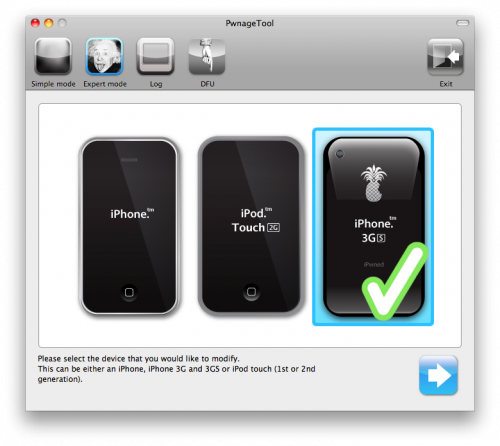
3. Now Start the PwnageTool 3.1.4 and
Select your Device.

select-iphone

4. Click the blue arrow button to continue. You will be brought to the “Browse for IPSW” page. It will now automatically detect the correct firmware for your device as shown in the screenshot below.

ipsw

5. Now new Windows Will come with 7 choices. Click to select General then click the blue arrow button.

6. Check Activate the phone if you are not with an official carrier then click the blue arrow button.

NOTE*: Deselect Activate if you have an iPhone legitimately activated on an official carrier.
NOTE*: You may need to increase the size of the root partition slightly. My first attempt failed at creating the IPSW until I increased the size to about 695 MB.

7. Now the Bootneuter settings are greyed out for the 3G iPhone. Click the blue arrow button.

8. Now the The Cydia settings page will come, click Download packages tab. Then click the Refresh button to display all the available packages. Double clicking the package you want will download it and make it available in the Select Packages tab.

9. Check the ones you want then continue.

10. Now the windows of Custom Packages Settings menu displays listed package settings for your custom IPSW. Leave these settings as it is. Click to continue.

11. The Custom Logos Settings menu allows you to add your own images as boot logos. Click the Browse button to select your Boot logo and Recovery logo.

12. Now you are ready to begin the pwnage process! Click the Build button to select it then click the Blue arrow button to begin.

13. After Continue it will asked to save your custom .ipsw file. Save it to your Pwnage folder you created on your Desktop.

14. Now Your IPSW is now being built. Please allow up to 10 minutes. Now You will be asked to enter your administrator password. Do this then click the OK button. You will be asked if your iPhone has been pwned before. If unsure click the NO button.

15. You will be prompted to close the PwnageTool application then put your iPhone into recovery mode. Click the OK button.

16. Make sure your iPhone is connected to the computer then follow these instructions:-

Now Open the iTunes and hold the Alt/Option key and click Restore. Now Select the custom IPSW that was created (iPhone2,1_3.1.2_7D11_Custom_Restore.ipsw) and saved it Pwnage folder ( Step 13) and click the Open button.

After this iTunes will now restore the firmware on your iPhone. This can also take up to 10 minutes. Once done you will be rebooted into jailbroken iPhone OS 3.1.2 ! So now Jailbreak is Complete

PwnageTool 3.1.4 unlocks iPhone 3.1.2 devices

The unofficial iPhone Dev Team team has released PwnageTool 3.1.4, an update to its Mac hacking utility for iPhones and iPods. The latest version is mainly addressed at unlocking iPhone 3.1.2, which was released last Thursday. 2G, 3G and 3GS iPhones are supported, as well as the first- and second-generation iPod touch, though the latter devices can only be jailbroken. Second-gen Touches must have previously been jailbroken, while third-gen Touches are completely incompatible.


Because of irreversible Apple baseband changes in iPhone 3.1.x, PwnageTool will only allow people to keep iPhones unlocked if they have been relying on custom IPSW files since iPhone 3.0 or earlier. Those in such a situation need only install ultrasn0w via Cydia after restoring to a custom IPSW, one without baseband alterations.

The Dev Team notes that any 3GS owner can now jailbreak v3.1.x through PwnageTool, though Apple is expected to fix the exploited hole in later firmware updates. People intent on keeping a 3GS jailbroken should thus record ECID hashes for future reference.

The group also mentions that it is providing custom IPSWs that can be installed by blackra1n users suffering problems with mobilesubstrate, winterboard, diskaid or ifunbox. It cautions that if blackra1n is installed on an iPhone 3G or 3GS, the stock v3.1.x firmware is used, eliminating any short-term unlocking possibilities. A hack for the latest basebands is said to be in development.

PwnageTool 3.1.4 for iPhone OS 3.1.2 now available

The ever-determined band at iPhone Dev have updated their "PwnageTool" to include the 3.1.2 release of the iPhone software for iPhone 2G/3G/3GS and iPod Touch 1G/2G (note that the iPod touch 3G is NOT supported).


Jailbreaking, which is different than "unlocking", allows different applications to be run other than the ones available at the App Store, and also allows for some additional functionality such as background process for third party applications. I assume that those who are interested in jailbreaking are already familiar with it enough to know what the 'dangers' are.

For the idly curious, I highly recommend that you check out the webpage and think about whether you really need the functionality it offers. Notably, this will not allow for things like internet tethering on a carrier that doesn't officially support it. The iPhone Dev folks suggest that you remain at 3.0 until a hack for that is developed.

While I haven't followed jailbreaking since the official App Store, I admire the persistence which the group of programmers attacks the closed iPhone system, finding their way in through various flaws that they are able to detect. I don't advocate jailbreaking and I don't dissuage people from it, assuming that they understand the risks. But as someone who knows a little about programming (emphasis on "a little"), I think it's interesting to watch.

This situation has been referred to as a "cat and mouse" game, where each release of the iPhone OS closes whatever hole the iPhone Dev team has used to get in, only to have subsequent holes found. One could even make the argument that the iPhone OS might be better off because of the iPhone Dev folks who work hard to discover these flaws which might otherwise go unreported. Do I ever imagine a day when the game ends? No. As long as there are restrictions on the iPhone, there will be people who look for a way around them. Apple could open up background processing for third party applications and approve every application submitting to the App Store and there would still be those who would want something else: full local access to the filesystem, for example.

Fortunately for me, I don't have any pressing "need" for jailbreaking. I wish that I could have access to the Google Voice applications which were yanked from the App Store, but overall I'm fairly content with what Apple offers. But for those who want more, the iPhone Dev team has spent a lot of hours to make this available. Happy jailbreaking.